UML (Unified Modelling Language) is my preferred standard for illustrating various aspects of solution architecture. Other standards are gaining popularity, particularly ArchiMate, which I find fairly impractical.
When using UML, I rarely adhere strictly to the formal specification, since almost no one actually fully knows it.
I often draw UML diagrams in draw.io, but sequence diagrams are impractical to draw, and easier write in plaintext and then render into a diagram. PlantUML is a text-based modelling tool that allows you to declare elements of your diagram and then render it. It’s only problem is that the website is riddled with annoying ads and popups, causing dizziness and high blood pressure.
Therefore, I have built a PlantUML-based editor: uml.asp-ugleberg.dk. It’s free – and add-free.
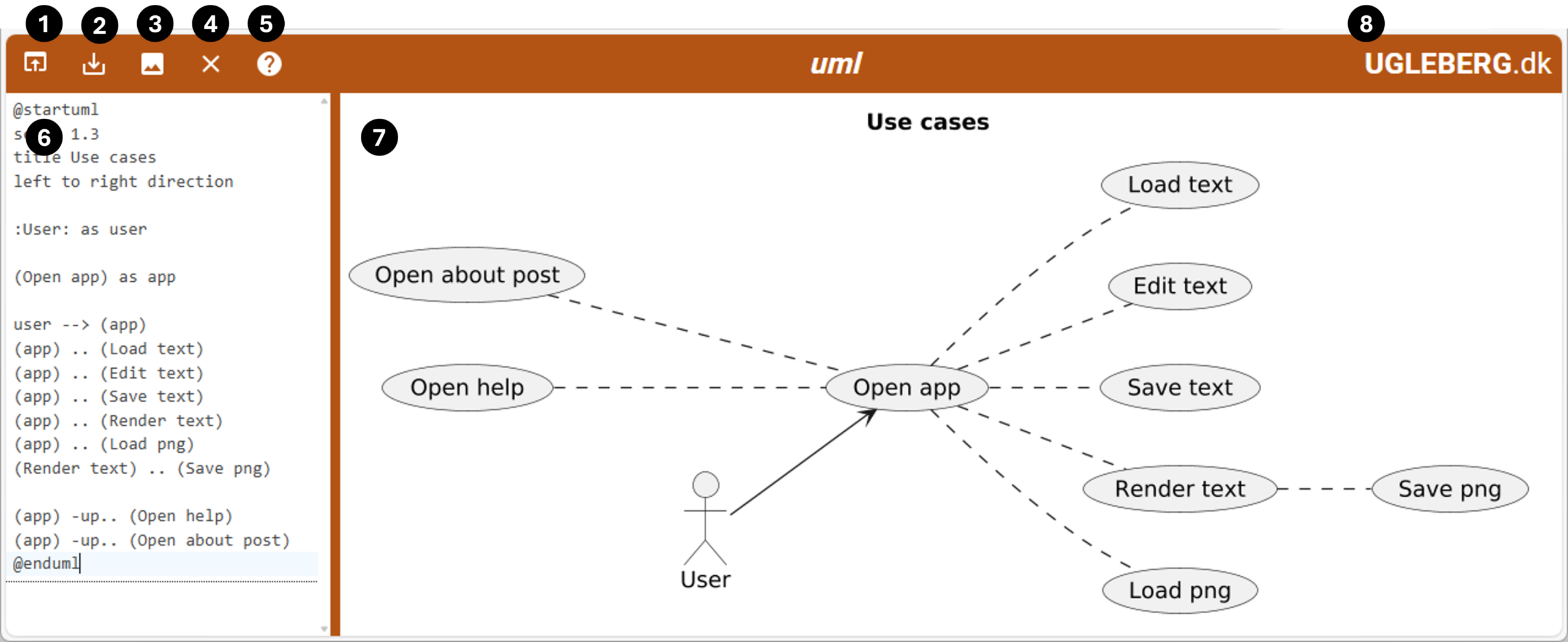
- Load file. You can either load a TXT file into the editor, or a PNG-file generated by the editor and saved as a picture. The source UML text is embedded in the metadata in the PNG file.
- Save the UML text currently being edited.
- Render the UML text in the editor. If successful, the diagram will be shown. If there are syntax errors in the UML text, the image area will be cleared.
- Clear the editor.
- Open the Plant UML reference guide i a separate tab in your browser.
- The editor in which you write your UML text.
- The image area where your UML text is rendered. Right-click on the image to save it as a PNG file. The PNG file includes the UML text from which is has been rendered, so you can open the diagram later, and change its UML text.
- Click on the company name to open this webpage.
Examples
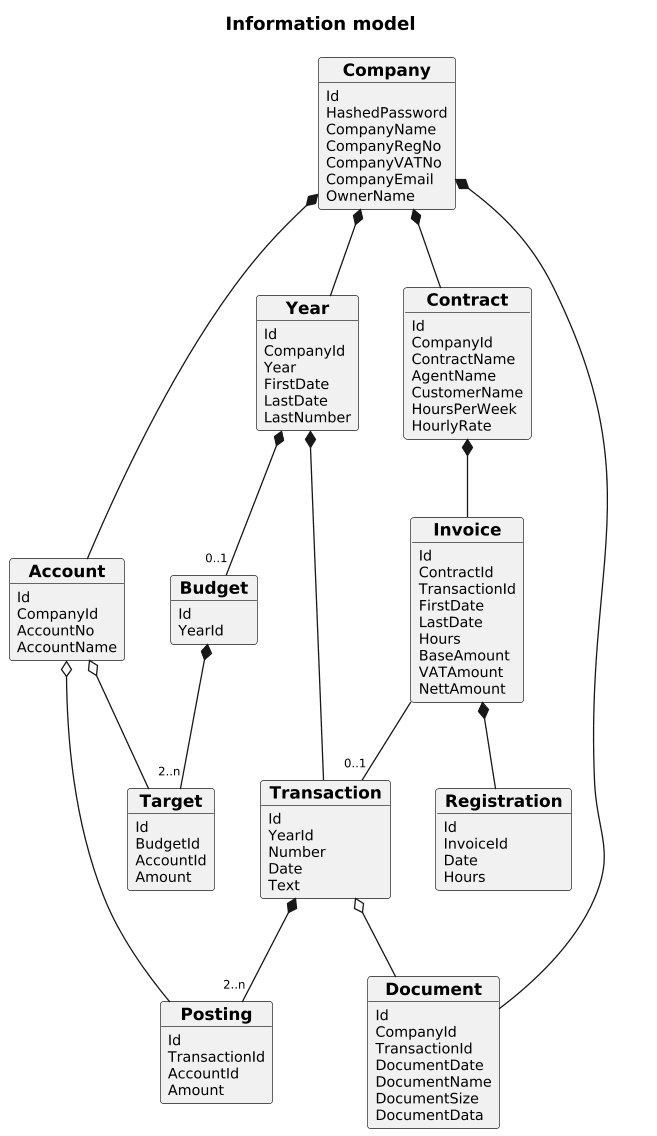
@startuml
scale 1.3
hide methods
title "Information model"
skinparam {
  arrowFontSize 9
  objectAttributeFontSize 11
}

object "===**Company**" as company {
  Id
  HashedPassword
  CompanyName
  CompanyRegNo
  CompanyVATNo
  CompanyEmail
  OwnerName
}

object "===**Contract**" as contract {
  Id
  CompanyId
  ContractName
  AgentName
  CustomerName
  HoursPerWeek
  HourlyRate
}

object "===**Invoice**" as invoice {
  Id
  ContractId
  TransactionId
  FirstDate
  LastDate
  Hours
  BaseAmount
  VATAmount
  NettAmount
}

object "===**Registration**" as registration {
  Id
  InvoiceId
  Date
  Hours
}

object "===**Year**" as year {
  Id
  CompanyId
  Year
  FirstDate
  LastDate
  LastNumber
}

object "===**Account**" as account {
  Id
  CompanyId
  AccountNo
  AccountName
}

object "===**Budget**" as budget {
  Id
  YearId
}

object "===**Target**" as target {
  Id
  BudgetId
  AccountId
  Amount
}

object "===**Transaction**" as transaction {
  Id
  YearId
  Number
  Date
  Text
}

object "===**Posting**" as posting {
  Id
  TransactionId
  AccountId
  Amount
}

object "===**Document**" as document {
  Id
  CompanyId
  TransactionId
  DocumentDate
  DocumentName
  DocumentSize
  DocumentData
}

company *-- contract
contract *-- invoice
invoice *-- registration
invoice -- "0..1" transaction
company *-- year
year *-- "0..1" budget
budget *-- "2..n" target
account o-- target
company *- account
year *-- transaction
transaction *-- "2..n" posting
account o-- posting
company *- document
transaction o-- document

@enduml